Icon Plugin for PhotoShop2.1
Publisher Description
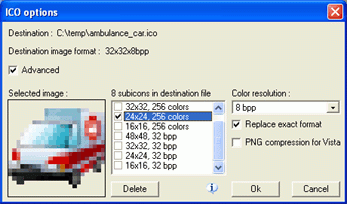
Icon Plugin for Photoshop enhances Adobe Photoshop with an ability to export and import Windows icons (.ico). Thanks to this ability, users can create compelling icons directly in Adobe Photoshop, using its large arsenal of creative tools and a convenient and familiar design environment. The use of the plug-in eliminates the need to use intermediate files and buy additional icon editors. In addition to Adobe Photoshop, the plug-in can work with Elements, AfterEffects, Premiere, PhotoDeluxe, Corel PhotoPaint, PaintShop Pro, Painter, and Photo.
Icon Plugin for Photoshop provides all the features, which are required to achieve professional results in creating icons. It supports multi-format icons, transparency and semi-transparency and allows making icons, which are compatible with Microsoft Windows XP and Vista. The plug-in also supports non-standard icons of different sizes and color resolutions, including monochrome, 16 colors, 256 colors, 24-bit True Color, and 32-bit True Color with semi-transparency. Customers have an ability to add and remove sub-icons from icons. The plug-in is compatible with all versions of Adobe Photoshop, including 3.0-7.0, CS, and Windows OS.
About Icon Plugin for PhotoShop
This Icon Tools program is available in English. It was last updated on 29 September, 2026. Icon Plugin for PhotoShop is compatible with the following operating systems: Windows.
The company that develops Icon Plugin for PhotoShop is SibCode. The latest version released by its developer is 2.1. This version was rated by 10 users of our site and has an average rating of 4.9.
The download we have available for Icon Plugin for PhotoShop has a file size of N/A. Just click the green Download button above to start the downloading process. The program is listed on our website since 2011-05-28 and was downloaded 1,410 times. We have already checked if the download link is safe, however for your own protection we recommend that you scan the downloaded software with your antivirus. Your antivirus may detect the Icon Plugin for PhotoShop as malware if the download link is broken.
How to install Icon Plugin for PhotoShop on your Windows device:
- Click on the Download button on our website. This will start the download from the website of the developer.
- Once the Icon Plugin for PhotoShop is downloaded click on it to start the setup process (assuming you are on a desktop computer).
- When the installation is finished you should be able to see and run the program.
Program Details
System requirements
Download information
Pricing
Version History
version 2.1
posted on 2011-05-28
Icon Plugin for PhotoShop is free now!
version 2.0
posted on 2006-10-17
Icon-plugin is free now!
